 a4504226fc
* fix: MultipleChoiceField use ordered sort

(cherry picked from commit 8436483e66af3d1317d99335b7fae95c1f58d13a)

* test: fix unit tests

(cherry picked from commit 6428ac4a05f4a33eb0813cc56d584f56e7bfac89)

* test: test TestMultipleChoiceField can json serializable

(cherry picked from commit 12908b149c446598682269f8df78290fa8268982)

* test: fix unit test

(cherry picked from commit 73a709c4b04ae510d61f2d426f93f6aef98b09fd)

* minor: rest old formatting

* fix: using pytest.fail to test

* Update test_fields.py

* Update test_fields.py

* Update test_fields.py

* test: add test cases

* docs: update docs

* Update docs/api-guide/fields.md

* Skip inner list allocation

* Fix punctuation

---------

Co-authored-by: Asif Saif Uddin {"Auvi":"অভি"} <auvipy@gmail.com>
Co-authored-by: Bruno Alla <browniebroke@users.noreply.github.com>
Co-authored-by: Bruno Alla <alla.brunoo@gmail.com>
|
||
|---|---|---|
| .github | ||
| .tx | ||
| docs | ||
| docs_theme | ||
| licenses | ||
| rest_framework | ||
| tests | ||
| .gitignore | ||
| .pre-commit-config.yaml | ||
| codecov.yml | ||
| codespell-ignore-words.txt | ||
| CONTRIBUTING.md | ||
| LICENSE.md | ||
| MANIFEST.in | ||
| mkdocs.yml | ||
| PULL_REQUEST_TEMPLATE.md | ||
| pyproject.toml | ||
| README.md | ||
| runtests.py | ||
| SECURITY.md | ||
| setup.cfg | ||
| tox.ini | ||
Django REST framework



Awesome web-browsable Web APIs.
Full documentation for the project is available at https://www.django-rest-framework.org/.
Overview
Django REST framework is a powerful and flexible toolkit for building Web APIs.
Some reasons you might want to use REST framework:
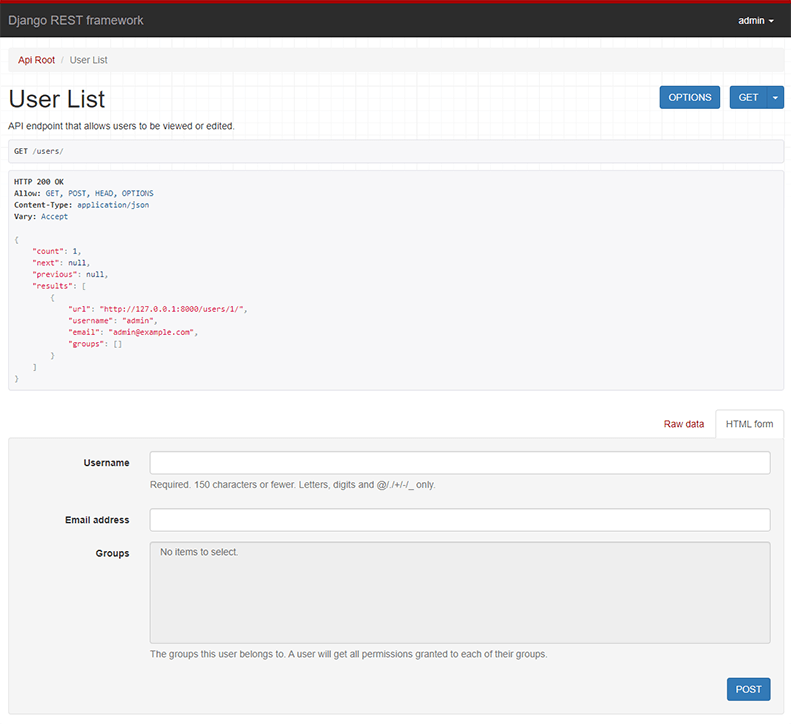
- The Web browsable API is a huge usability win for your developers.
- Authentication policies including optional packages for OAuth1a and OAuth2.
- Serialization that supports both ORM and non-ORM data sources.
- Customizable all the way down - just use regular function-based views if you don't need the more powerful features.
- Extensive documentation, and great community support.
Below: Screenshot from the browsable API
Requirements
- Python 3.10+
- Django 4.2, 5.0, 5.1, 5.2, 6.0
We highly recommend and only officially support the latest patch release of each Python and Django series.
Installation
Install using pip...
pip install djangorestframework
Add 'rest_framework' to your INSTALLED_APPS setting.
INSTALLED_APPS = [
    # ...
    "rest_framework",
]
Example
Let's take a look at a quick example of using REST framework to build a simple model-backed API for accessing users and groups.
Start up a new project like so...
pip install django
pip install djangorestframework
django-admin startproject example .
./manage.py migrate
./manage.py createsuperuser
Now edit the example/urls.py module in your project:
from django.contrib.auth.models import User
from django.urls import include, path
from rest_framework import routers, serializers, viewsets


# Serializers define the API representation.
class UserSerializer(serializers.HyperlinkedModelSerializer):
    class Meta:
        model = User
        fields = ["url", "username", "email", "is_staff"]


# ViewSets define the view behavior.
class UserViewSet(viewsets.ModelViewSet):
    queryset = User.objects.all()
    serializer_class = UserSerializer


# Routers provide a way of automatically determining the URL conf.
router = routers.DefaultRouter()
router.register(r"users", UserViewSet)

# Wire up our API using automatic URL routing.
# Additionally, we include login URLs for the browsable API.
urlpatterns = [
    path("", include(router.urls)),
    path("api-auth/", include("rest_framework.urls", namespace="rest_framework")),
]
We'd also like to configure a couple of settings for our API.
Add the following to your settings.py module:
INSTALLED_APPS = [
    # ... make sure to include the default installed apps here.
    "rest_framework",
]

REST_FRAMEWORK = {
    # Use Django's standard `django.contrib.auth` permissions,
    # or allow read-only access for unauthenticated users.
    "DEFAULT_PERMISSION_CLASSES": [
        "rest_framework.permissions.DjangoModelPermissionsOrAnonReadOnly",
    ]
}
That's it, we're done!
./manage.py runserver
You can now open the API in your browser at http://127.0.0.1:8000/, and view your new 'users' API. If you use the Login control in the top right corner you'll also be able to add, create and delete users from the system.
You can also interact with the API using command line tools such as curl. For example, to list the users endpoint:
$ curl -H 'Accept: application/json; indent=4' -u admin:password http://127.0.0.1:8000/users/
[
    {
        "url": "http://127.0.0.1:8000/users/1/",
        "username": "admin",
        "email": "admin@example.com",
        "is_staff": true,
    }
]
Or to create a new user:
$ curl -X POST -d username=new -d email=new@example.com -d is_staff=false -H 'Accept: application/json; indent=4' -u admin:password http://127.0.0.1:8000/users/
{
    "url": "http://127.0.0.1:8000/users/2/",
    "username": "new",
    "email": "new@example.com",
    "is_staff": false,
}
Documentation & Support
Full documentation for the project is available at https://www.django-rest-framework.org/.
For questions and support, use the REST framework discussion group, or #restframework on libera.chat IRC.
Security
Please see the security policy.